A mobile workstation cart can turn a shared room, classroom, or office corner into a usable workspace without committing to a fixed desk. The right choice depends on what you need to carry: a laptop, a mounted monitor, or a complete computer setup.
These 10 options span compact rolling stands, carts with keyboard trays and storage, a dual-monitor setup, and an enclosed AV cart. Use the buying guide below to narrow down the features that matter before you choose.
Best 10 Mobile Workstation Cart Picks for 2026
Best Single-Monitor Cart
Mount-It! Computer Cart with CPU Holder
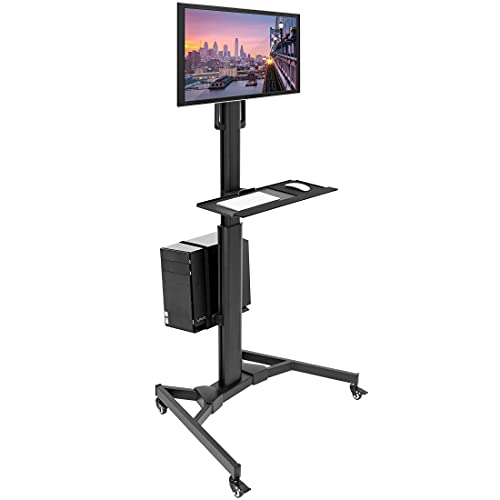
- Mounts one screen up to 32 inches
- Includes keyboard tray and strapped CPU holder
- Four-caster steel-base design
Best For: Moving a complete single-monitor desktop setup
Best Sit-Stand Surface
Mount-It! 28-Inch Mobile Computer Cart

- 28-inch desktop with device slot
- Gas-spring lift adjusts from 29.5 to 43.3 inches
- Two shelves and two locking casters
Best For: Sit-stand work with supplies or equipment stored below
Best Rolling Podium
Mount-It! Monitor Cart with Storage

- Adjusts from 37.25 to 53.75 inches
- Mounts one screen up to 32 inches
- Keyboard tray, lower storage, and locking casters
Best For: Standing presentations and classroom computer stations
Best Dual-Monitor Setup
Mount-It! Dual Monitor Computer Cart

- Supports two screens up to 32 inches each
- Independent monitor and keyboard height adjustment
- CPU holder, cable management, and locking casters
Best For: Moving a dual-screen desktop workstation
Best for Shelf Storage
Mount-It! Adjustable Two-Tier Computer Cart

- 37.25–53.75-inch manual height range
- Mount supports screens up to 32 inches
- Keyboard tray and lower storage space
Best For: Classrooms and offices needing storage alongside a monitor
Best for a Full PC Setup
Mount-It! Rolling Cart with CPU Holder

- Mount supports screens up to 32 inches
- Full-sized adjustable keyboard tray
- Strapped, adjustable CPU holder
Best For: Moving a desktop PC setup between work areas
Best for Screen Positioning
VIVO Compact Mobile Computer Cart

- ±15-degree tilt and 360-degree swivel
- Adjustable monitor, tray, and CPU positions
- Two lockable casters
Best For: Mobile PC stations needing flexible screen angles
Best for Monitor Mounting
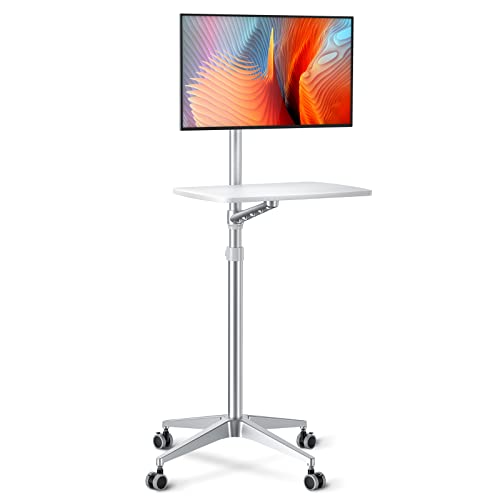
- Monitor or laptop arm
- 34–48.6-inch height range
- Four lockable wheels
Best For: Compact screen-and-accessory setups
Best for Powered AV Gear

- 3 AC outlets and 2 USB ports
- Locking cabinet and keyboard tray
- 28.5–43.3-inch height range
Best For: Mobile AV setups needing power and storage
Best for Multi-Shelf Storage
Mount-It! Rolling Standing Desk
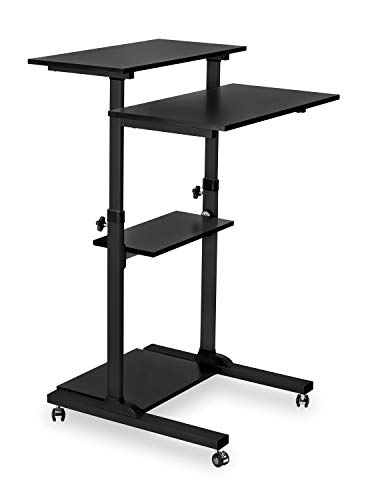
- Four equipment shelves
- 37.25–54.7-inch height range
- 33-pound capacity per shelf
Best For: Organized classroom or office equipment setups
Best Single-Monitor Cart – Mount-It! Computer Cart with CPU Holder
This mobile workstation cart keeps a desktop computer setup together as you move between work areas. It pairs a mount for one monitor up to 32 inches with a keyboard-and-mouse tray and an adjustable CPU holder.
Best For: Anyone who needs to move a single-monitor desktop setup rather than just a laptop.
Pros:
- Monitor mount supports VESA 75 x 75 mm and 100 x 100 mm patterns.
- Adjustable monitor mount and keyboard tray help position the setup for standing work.
- CPU holder includes buckle straps, and four casters make the cart movable.
Cons:
- Designed for one monitor, not a dual-screen setup.
- Monitor compatibility is limited to the stated size, VESA patterns, and 17.6-pound weight recommendation.
Choose this model when keeping your tower, display, and input devices on one rolling stand matters more than having a broad desktop surface.
Best Sit-Stand Surface – Mount-It! 28-Inch Mobile Computer Cart
If you want a mobile workstation cart with room for a laptop, paperwork, or a monitor, this model offers a 28-inch desktop. Its gas-spring-assisted height adjustment spans 29.5 to 43.3 inches, making it suitable for seated and standing tasks.
Best For: Shared offices, classrooms, or home workspaces that need an adjustable work surface and equipment storage.
Pros:
- Gas-spring-assisted lift makes height changes easier.
- Desktop includes a device slot; a separate lower tray holds a keyboard.
- Two storage shelves and four swivel casters, including two locking wheels, add utility.
Cons:
- The lower keyboard platform is fixed rather than independently height-adjustable.
- Assembly is required, and the stated maximum weight recommendation is 33 pounds.
This is the more desk-like choice in the group, especially if you need shelf space. Check that its height range and load recommendation suit the equipment you plan to use.
Best Rolling Podium – Mount-It! Monitor Cart with Storage
This mobile workstation cart is a practical fit for teaching or presenting where a screen, keyboard, and supplies need to travel together. It combines a monitor mount for screens up to 32 inches with a middle keyboard tray and lower storage space.
Best For: Teachers and presenters who want a rolling computer station with room below for materials or equipment.
Pros:
- Adjusts from 37.25 to 53.75 inches in height.
- Two-tier layout separates the monitor area from the keyboard and mouse.
- Lower storage space and locking casters support use as a rolling podium.
Cons:
- The 37.25-inch minimum height may be too tall for some seated setups.
- Supports one monitor up to 32 inches; the mount tilts 15 degrees.
Its tall height range and lower storage favor standing presentations. If seated typing is the priority, compare the minimum height with your preferred working position.
Best Dual-Monitor Setup – Mount-It! Dual Monitor Computer Cart
For a two-screen desktop setup, this mobile workstation cart puts both monitors, a keyboard, and a computer tower on one rolling frame. Each monitor mount supports a screen up to 32 inches and 17.6 pounds.
Best For: Users who need two displays on a movable computer station in an office, classroom, lab, or similar workspace.
Pros:
- Dual mounts offer tilt and swivel for adjusting viewing angles.
- Monitor mounts and keyboard tray have independent height adjustment.
- Integrated CPU holder fits towers 4.75 to 8 inches wide; cable management helps organize cords.
- Locking casters let you secure the cart during use.
Cons:
- Each monitor must stay within the stated 32-inch and 17.6-pound limits.
- The CPU holder fits only towers within its specified width range.
Choose this cart when two mounted displays are essential. Confirm monitor weights and tower width before buying so the full setup fits the listed limits.
Best for Shelf Storage – Mount-It! Adjustable Two-Tier Computer Cart
This mobile workstation cart pairs a monitor mount for screens up to 32 inches with a keyboard tray and lower storage space. Its manually adjustable height spans 37.25 to 53.75 inches, making it a practical choice when a rolling workspace needs room for supplies as well as a screen.
Best For: Classrooms and offices that need a height-adjustable cart with space for equipment or materials.
Pros:
- Adjusts from 37.25 to 53.75 inches for different working heights.
- Includes a keyboard tray and lower space for items such as a printer or PC.
- Rolling casters lock when the cart needs to stay in place.
Cons:
- Height adjustment is manual.
- Its 27.5-by-28-inch footprint may be less suitable for tight spaces.
Choose this model if accessible storage matters more than a compact pole-style layout. The tilting monitor mount adds some viewing flexibility, while the locking casters help keep the setup stationary during use.
Best for a Full PC Setup – Mount-It! Rolling Cart with CPU Holder
This mobile workstation cart brings a monitor, full-sized keyboard tray, and CPU holder together on a rolling steel frame. At 70 inches tall, it suits workspaces where a desktop PC setup needs to move between locations.
Best For: Professionals who move a monitor-and-PC setup between offices, classrooms, or clinical work areas.
Pros:
- Monitor mount accommodates screens up to 32 inches.
- Includes an adjustable keyboard tray and floating CPU holder with buckle straps.
- Four caster wheels make the workstation movable.
Cons:
- The listed maximum weight capacity is 17.6 pounds; confirm your intended monitor and equipment fit the stated limits.
- No general-purpose shelf storage is listed.
The dedicated CPU holder is the main reason to pick this model over a cart with open shelves. Check equipment fit before buying, particularly if your desktop setup includes a heavier monitor.
Best for Screen Positioning – VIVO Compact Mobile Computer Cart
This mobile workstation cart provides a compact, rolling setup for a monitor, keyboard, and PC. Its screen mount tilts, swivels, and rotates, while the mount, keyboard tray, and CPU holder can each be positioned along the center pole.
Best For: Work areas where users need to reposition a screen and move a complete PC station.
Pros:
- Fits 17- to 32-inch monitors weighing up to 17.6 pounds.
- Screen mount offers ±15-degree tilt, 360-degree swivel, and 360-degree rotation.
- Includes a padded keyboard tray, CPU safety belt, and two lockable casters.
- Removable VESA plate supports 75-by-75 mm and 100-by-100 mm mounting patterns.
Cons:
- Keyboard and mouse capacity is limited to 4.4 pounds.
- Monitor and CPU limits of 17.6 and 22 pounds require an equipment check.
Its adjustable viewing angles make this a strong fit when screen positioning is a priority. Verify your monitor’s VESA pattern and the weight of each component before choosing it.
Best for Monitor Mounting – Viozon Adjustable Mobile Desk
This mobile workstation cart pairs a monitor or laptop arm with a 21-by-14-inch work surface, making it a flexible choice when you want your screen and accessories to move together. Its height adjusts from 34 to 48.6 inches.
Best For: Moving a compact monitor or laptop setup between work areas.
Pros:
- Arm accommodates 17- to 27-inch monitors or 12- to 17-inch laptops.
- Four lockable wheels help position and park the stand.
- Water-resistant desktop provides space for a keyboard, mouse, or other small equipment.
Cons:
- The desktop’s stated maximum load is 17.6 pounds.
- A heavier monitor may require adjusting the arm tension.
Choose this model for its integrated screen arm rather than a large worktop; check your equipment’s size and weight before buying.
Best for Powered AV Gear – Adjustable Mobile AV Cart
This mobile workstation cart combines a pullout keyboard tray, locking cabinet, and built-in power access for equipment-heavy setups. Its work height adjusts from 28.5 to 43.3 inches with a tool-free, one-hand mechanism.
Best For: Presenters or shared workspaces that need mobile equipment storage and accessible outlets.
Pros:
- Three AC outlets and two USB ports provide connections for multiple devices.
- Lockable steel cabinet adds enclosed storage.
- Four swivel casters each have a locking brake.
Cons:
- The 43.3-inch maximum height may be too low for some standing users.
- The supplied notes conflict on capacity: one bullet says 400 pounds, while another and the specifications say 300 pounds.
This is the storage-and-power option of the group. If you plan to load it with heavy equipment, confirm the rated capacity before purchase.
Best for Multi-Shelf Storage – Mount-It! Rolling Standing Desk
This mobile workstation cart offers four shelves for separating a screen, keyboard, accessories, and larger equipment. The frame adjusts from 37.25 to 54.7 inches across 11 locking height positions.
Best For: Classrooms or offices that need a taller rolling desk with dedicated equipment shelves.
Pros:
- Four shelves provide a stated 132-pound combined capacity, with 33 pounds per shelf.
- Wide height range suits standing work and presentations.
- Two of the four casters lock to hold the cart in place.
Cons:
- Only two casters lock, rather than all four.
- Each shelf has a 33-pound limit, regardless of the total capacity.
Its tiered layout is useful when a single desktop would get crowded. Check the dimensions and weight of each device against its intended shelf.
How We Picked These Mobile Workstation Carts
We organized the 10 selected carts around practical setup needs: laptop versus desktop use, single- versus dual-monitor support, available work surface, height adjustment, storage, and mobility. The product names identify some features, but they do not establish build quality or real-world stability. Check current specifications and owner feedback before ordering, especially where a listing does not clearly state its dimensions or limits.
Quick Comparison: Which Style Fits?
For a desktop computer, start with a cart that has a monitor mount and enough room for your keyboard, mouse, and any CPU you need to carry. The listed dual-monitor Mount-It! cart is the one to examine if your work requires two displays; confirm that both monitors meet its mounting and weight requirements.
If you mainly use a laptop, a rolling desk or podium-style stand may provide the surface you need without a monitor arm. For equipment that must travel together, compare the carts with shelves against the enclosed AV cart, which lists a locking cabinet, outlets, and USB ports. Those are different approaches to storage: choose based on whether you need quick access or a place to secure gear.
Key Buying Factors for a Mobile Workstation Cart
Equipment Fit and Workspace
Measure your monitor, laptop, keyboard, and any peripherals before comparing cart dimensions. For mounted displays, verify VESA compatibility, screen-size limits, and the mount’s weight rating; screen size alone is not enough. A pullout keyboard tray can save surface space, but make sure it accommodates both typing and mouse use if that is how you work.
Height and Ergonomics
Compare the usable height range with your seated or standing working position. Check whether the desktop, monitor, and keyboard adjust together or independently. A cart that reaches the right monitor height may still put the keyboard too high for comfortable typing.
Wheels, Stability, and Room Access
Check the cart’s overall footprint against doorways, storage spaces, and the routes you will roll it through. Locking wheels help hold a cart in place, but wheel locks do not guarantee that a tall setup will resist wobble. Consider the total loaded weight and follow the stated capacity for each shelf, tray, and mount.
Power and Assembly
Plan how power cords will reach an outlet while the cart is parked, and how cables will stay clear of the wheels in motion. Built-in outlets are useful only if their placement and ratings suit your equipment. Review assembly requirements, too, particularly for monitor-mounted carts.
Who Should Buy Which Mobile Workstation Cart?
Choose a compact laptop stand or podium cart for presentations and light computer work. Choose a single-monitor cart with a keyboard tray for a rolling desktop station, or the listed dual-monitor model if two displays are essential. Look for shelves when peripherals need to move with you; consider the AV cart when enclosed storage and onboard power are priorities. If you expect to work in one spot most of the day, compare these carts with a conventional desk before trading desktop area for mobility.